

Losing a load cell's datasheet can stop your project cold. Without this key document, calibration seems impossible, and your expensive component feels useless. But you can determine its sensitivity yourself.
The best way to find a load cell's sensitivity without a datasheet is to conduct a simple experiment. By connecting a stable power supply and a precise multimeter, you can measure the output voltage with no load and then with a known weight. This data allows you to calculate the sensitivity directly.

This might sound like a complex engineering task, but it's more straightforward than you think. As a manufacturer of industrial scales for 18 years, I've seen this situation many times. It's frustrating, but it's solvable. You don't need a state-of-the-art lab to get a reliable reading. You just need a methodical approach and a few basic tools. In this post, I'll walk you through the exact steps we use in our own R&D department to characterize unknown components. Let's get that load cell working for you.
What is the standard procedure for calibrating a load cell with unknown specifications?
An unknown load cell is just a paperweight. Without its specifications, proper calibration feels impossible, which wastes your time and money. Luckily, a standard procedure can bring it back to use.
The standard procedure involves a physical test. First, secure the load cell to a stable surface. Then, connect it to a regulated power supply and a high-precision multimeter. After letting it stabilize, record the baseline voltage. Finally, apply a known weight and record the new voltage.

To get accurate results, you need to be systematic. This process breaks down into setting up, connecting, and measuring. At Weigherps, our quality control department does this day in and day out. Here is how you can replicate our professional process in your own workshop.
Setting Up the Test Bench
Your first step is to create a stable environment. Any vibration or movement can throw off your readings.
- Find a Rigid Surface: Use a heavy, stable workbench that doesn't wobble.
- Secure the Load Cell: Mount the load cell securely in a fixture or vise. It must be held in the same orientation it will be used in. Ensure that force will be applied directly along its intended axis.
Making the Electrical Connections
| Connecting the load cell correctly is crucial. Most load cells use a 4-wire or 6-wire configuration. A 4-wire setup is most common for simple tests. | Wire Color (Typical) | Function | Connection Point |
|---|---|---|---|
| Red | Excitation+ | Positive (+) terminal of DC Power Supply | |
| Black | Excitation- | Negative (-) terminal of DC Power Supply | |
| Green | Signal+ | Positive (+) probe of the Multimeter | |
| White | Signal- | Negative (-) probe of the Multimeter |
Performing the Calibration Steps
With everything set up, you can begin the measurement.
- Turn on the power supply (a 10V setting is common). Let the system warm up for a few minutes to stabilize.
- With no weight on the load cell, measure the voltage between the Signal+ and Signal- wires. This is your zero-load voltage1 (V₀). Write it down.
- Carefully place a known, calibrated weight onto the load cell.
- Measure the voltage again. This is your loaded voltage2 (V₁). Write it down.
By repeating this with several different weights, you can confirm the load cell's linearity and get a very accurate a picture of its performance.
How can you use known weights to test a load cell's mV/V output?
You have the weights, but you don't know the process. Just guessing the output will lead to inaccurate measurements and unreliable equipment. You can use those weights systematically to find the exact mV/V output.
To do this, you apply a calibrated weight to the powered load cell. You then measure the change in output voltage in millivolts (mV). Finally, you divide this voltage change by the excitation voltage you supplied in volts (V). The result is your load cell's sensitivity.

This calculation is the heart of determining sensitivity. It sounds academic, but I'll show you how simple it is with a real-world example. Imagine you’re a technical director trying to integrate an unknown part into your new smart device. Getting this right is the difference between a prototype that works and one that fails. Precision here is everything. Let's break down the math with numbers you'd actually see on your multimeter.
The Sensitivity Formula
The sensitivity of a load cell is expressed in millivolts per volt (mV/V). This tells you how many millivolts the output signal will change for every volt of excitation an in input, when the load cell is at its full rated capacity. Since we don't know the capacity, we calculate the output for a specific, known weight.
The practical formula we use is:
Output for a given weight (mV/V) = (Voltage_with_load - Voltage_no_load) / Excitation_Voltage
A Practical Example
Let's walk through a test. Our goal is to find the sensitivity of an unknown load cell using a 10 kg weight.
| Step | Action | Measurement |
|---|---|---|
| 1 | Connect a stable DC power supply and set it to 10V. | Excitation Voltage = 10.0 V |
| 2 | Measure the output signal with no weight on the cell. | No-Load Voltage (V₀) = 1.50 mV |
| 3 | Place a 10 kg calibrated weight onto the cell. | Applied Weight = 10 kg |
| 4 | Measure the output signal with the weight on the cell. | Loaded Voltage (V₁) = 11.50 mV |
Calculating the Result
Now, we plug our measurements into the formula.
-
Calculate the voltage change (ΔV):
ΔV = Loaded Voltage - No-Load Voltage
ΔV = 11.50 mV - 1.50 mV = 10.0 mV -
Calculate the mV/V output for that 10 kg weight:
Output = ΔV / Excitation Voltage
Output = 10.0 mV / 10.0 V = 1.0 mV/V
This result tells us that applying a 10 kg weight produces a 1.0 mV/V output3. Many load cells have a sensitivity of 2.0 mV/V at full capacity. If we assume this is a standard cell, we could infer that 10 kg is 50% of its capacity, making it a 20 kg load cell.
What equipment do you need to manually determine a load cell's sensitivity?
So, you're ready to start testing, but are you sure you have the right tools? Using the wrong equipment will give you unreliable data, making the whole effort pointless. You only need a few key pieces of equipment to get accurate results.
To manually determine a load cell's sensitivity, you will need four essential items: a stable DC power supply, a high-precision digital multimeter (DMM), a set of calibrated standard weights, and a sturdy fixture or platform to hold the load cell securely during testing.
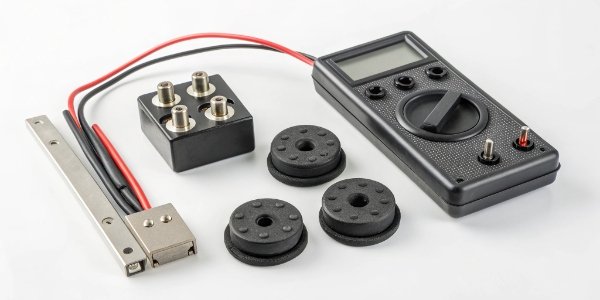
Over the years, our company has equipped many labs and production lines. We know from experience that skimping on any of these four items can compromise the entire measurement. Think of it like a chain; it's only as strong as its weakest link. Let's look at why each piece is so important for getting data you can trust.
Essential Equipment for Load Cell Testing
| Equipment | Key Requirement | Why It's Important |
|---|---|---|
| DC Power Supply | Stable and Regulated | The excitation voltage4 is the "V" in "mV/V." If it fluctuates, your entire calculation will be wrong. A regulated supply provides a clean, consistent voltage, which is non-negotiable for a reliable baseline. |
| Digital Multimeter (DMM)_ | High Precision | You are measuring tiny voltage changes, often less than 20 millivolts (0.020 V). A standard household multimeter may not have the resolution. You need a DMM that can accurately read down to the microvolt (μV) or at least 0.01 mV level. |
| Standard Weights | Calibrated and Known Mass | The accuracy of your output depends directly on the accuracy of your input. Using an object that "weighs about 5 kg" is not good enough. Use weights that have been calibrated, so you know their mass with a high degree of certainty. |
| Mounting Fixture | Rigid and Stable | The load cell must be completely still, with force applied only along the measurement axis. A proper fixture prevents torsion, side loads, or vibrations from interfering and creating noise in your signal output. |
As an OEM/ODM provider, we often help our clients set up their own testing protocols. A common mistake we see is using a cheap power adapter instead of a proper benchtop power supply. This single choice can introduce so much electrical noise5 that the readings become useless. Investing in these four quality tools is investing in data accuracy.
Can a load cell be identified by its color code or part number markings?
The datasheet is gone, but you see some numbers and colored wires on the cell itself. These cryptic markings seem confusing, but you're wondering if they hold the key. Yes, these markings can often lead you directly to the information you need.
Absolutely. A part number is the most direct route. You can search it online to find the manufacturer's website and original datasheet. The wire color code is also a huge help, as it often follows a standard that allows you to connect the load cell correctly for testing.
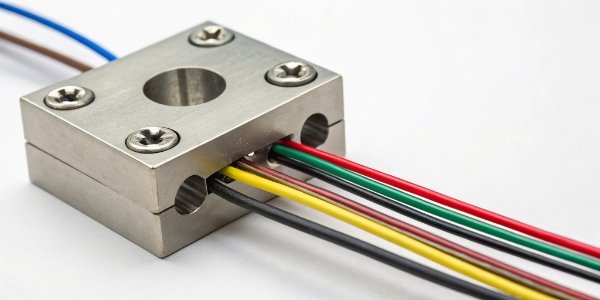
Before you even think about setting up a test, the first thing you should do is play detective. I've personally helped clients identify mystery components from a single, blurry photo. The information is often hiding in plain sight. Looking for these markings should always be your first step, as it can save you hours of work.
Decoding Part Numbers
The string of letters and numbers on the load cell is its part number. This is your golden ticket.
- Search Online: Type the full part number6 into a search engine. This will often lead you to a product page, a distributor listing, or a PDF of the datasheet.
- Check Manufacturer Websites: If you can identify the manufacturer's logo, go to their website and search for the part number in their support or products section.
- Ask the Community: If your search comes up empty, it might be a custom OEM part. Try posting a picture and the part number on engineering forums. Someone out there has likely seen it before.
Understanding Wire Color Codes
| If you can't find a datasheet but want to test the cell, the wire colors can guide you. While not universal, many manufacturers follow a common standard. | Common Wire Color | Function | Description |
|---|---|---|---|
| Red | Excitation+ (Exc+) | The positive wire for the power supply. | |
| Black | Excitation- (Exc-) | The negative or ground wire for the power supply. | |
| Green | Signal+ (Sig+) | The positive wire for the output signal. | |
| White | Signal- (Sig-) | The negative wire for the output signal. |
Knowing this common configuration allows you to connect the power supply and multimeter with a high degree of confidence. This is often enough to perform the sensitivity test we discussed earlier. Always double-check for variations; some 6-wire cells include sense wires (often blue and orange) that help the indicator compensate for voltage drop in long cables. For a simple bench test, these can usually be left disconnected.
Conclusion
Losing a datasheet is not a dead end. By performing a methodical test with known weights or by investigating its markings, you can find a load cell's sensitivity and use it successfully.
-
Measuring zero-load voltage is a critical step in load cell calibration; explore methods to do it accurately. ↩
-
Understanding loaded voltage helps in interpreting load cell performance; discover its significance. ↩
-
Understanding mV/V output is essential for interpreting load cell sensitivity; explore its implications. ↩
-
Excitation voltage is critical for load cell operation; learn its role in accurate measurements. ↩
-
Understanding electrical noise is crucial for accurate readings; learn how to minimize its impact. ↩
-
A load cell's part number can lead you to its datasheet; learn how to use it effectively. ↩


Comments (0)