

Counting thousands of small parts is tedious and error-prone. A counting scale boosts efficiency by doing the work for you. It ensures accuracy and saves valuable production time.
To choose the right counting scale, you must first analyze your production needs. Select a scale by matching its capacity and readability to your parts. Then, consider essential features like connectivity for software integration and a durable design for your specific factory environment.

Choosing the right equipment is the first step toward optimizing your production line. After 18 years of manufacturing industrial scales, I’ve seen that the right counting scale1 is more than just a weighing device. It's a critical data collection point2 that can transform your inventory management. It’s not just about what the scale does, but how it fits into your entire workflow. Getting this choice right from the start prevents countless headaches and ensures a smooth, efficient operation. Let's break down how to find the perfect match for your needs.
What are the key features to look for in an industrial counting scale?
Worried about picking a scale with features you will never use? The right functions can streamline your work. We will help you identify the essential features for real production gains.
Focus on three key areas: a high internal counting resolution for accuracy, a large parts-lookup (PLU) memory to store piece weights, and robust connectivity options like RS-232 or Ethernet to link with your systems.
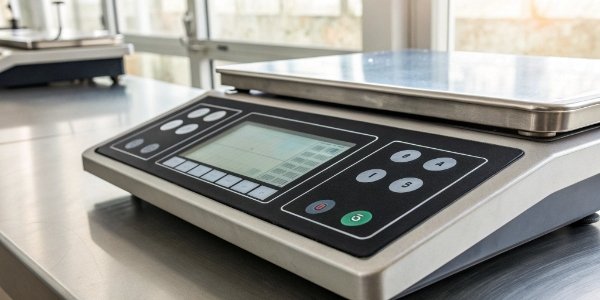
When you select a counting scale, the features determine its usefulness on your factory floor. You need to look beyond the basic weighing function. Advanced counting functions are critical. For example, Auto Piece Weight Enhancement automatically re-calculates the piece weight as more parts are added, which greatly improves accuracy for large counts. Another key feature is an accumulator memory3, which sums up multiple counts into a single grand total. This is perfect for totaling parts from several boxes. Look for models with durable, sealed keypads and stainless steel platforms, especially if your environment is dusty or damp. An IP rating4, like IP65, tells you the scale is protected against dust and water.
Here’s a simple breakdown of features to consider:
| Feature Level | Key Functions | Best For |
|---|---|---|
| Basic | Standard Counting, Tare | Simple, low-volume counting tasks. |
| Intermediate | Accumulation, PLU Memory | Repetitive counting of different parts. |
| Advanced | Auto Piece Weight Enhancement, Connectivity (RS-232, Ethernet), Check Counting | High-volume, high-accuracy environments needing data integration. |
How do you determine the correct capacity and readability for a counting scale?
Choosing the wrong capacity can lead to inaccurate counts or even a damaged scale. Imagine perfectly balancing load capacity with fine precision. We can show you how to find that ideal balance.
Determine capacity by the heaviest batch you will count, including the container. For readability, the scale must reliably detect your lightest single part. The scale’s resolution should be at least ten times finer than the single piece weight.

Capacity and readability are the two most fundamental specifications of any scale. Capacity is the maximum weight the scale can handle. Always choose a capacity that is higher than the heaviest total weight you plan to count. If a full box of your parts weighs 25 kg, a scale with a 30 kg capacity provides a safe margin.
Readability, or resolution, is the smallest increment of weight the scale can display. This is critical for counting accuracy, especially with very light parts. If your scale cannot reliably detect the weight of a single part, your counts will be wrong. For example, if your lightest component weighs 0.5g, you need a scale with a readability of 0.05g or better to get a good count. Don’t compromise on readability to get a higher capacity in one scale. Sometimes, the best solution is to use two separate scales: a high-resolution scale for sampling, and a high-capacity scale for bulk counting.
What factors most affect the accuracy of a parts counting scale?
Are your inventory counts still wrong even with a new counting scale? External factors can compromise your scale's accuracy. We will reveal the hidden culprits and show you how to fix them.
The biggest factors are environmental interference, like vibrations and air drafts, an inconsistent sample weight when counting, and improper or infrequent calibration. Always place the scale on a sturdy, level surface and ensure it's professionally calibrated regularly.

A high-quality scale is only accurate if it's used correctly in the right environment. I've seen many clients struggle with accuracy, and it almost always comes down to one of three things.
First is the environment. Industrial settings can have heavy vibrations from machinery or forklifts. Air conditioning, fans, or even an open door can create drafts that affect the readings of a sensitive scale. Always use your scale on a solid, level table away from these disturbances.
Second is the sampling process. A counting scale1 works by dividing the total weight by the weight of a single piece. If your initial sample is too small (e.g., only 5 pieces) or the pieces themselves vary in weight, the calculated average piece weight will be inaccurate. Always use a larger sample, like 25 or 50 pieces, to get a more accurate average.
Finally, calibration is essential. All scales drift over time. Regular calibration with certified weights ensures your scale's measurements are true and accurate. We recommend a calibration schedule based on your usage and quality standards. As part of our service, we help customers establish this.
How can a counting scale be integrated with inventory management software?
Your scale collects data, but is that data trapped on its screen? Manual data entry leads to errors and wastes time. Imagine your scale sending count data directly to your inventory system, automatically.
Integration is done through communication ports like RS-232, USB, or Ethernet. The scale sends data strings that your software is programmed to capture. We provide the communication protocols and technical support to make this link seamless.

For our clients in the software industry, this is the most critical question. A scale becomes a smart IoT device once it's connected. Most industrial counting scales come with a standard communication port, like an RS-232 or USB. More advanced models offer Ethernet or Wi-Fi for network integration. The scale can be set to output data in a continuous stream or send it only when a "print" button is pressed. This data string contains the weight, count, and other information.
Your software developers can then write code to 'listen' to the scale's communication port. They parse this data string to extract the count and automatically update your inventory management system, ERP, or WMS. This eliminates manual typing, which is a major source of inventory errors. At Weigherps, we partner with software providers. We supply detailed communication protocols and even offer developer support to ensure your software can communicate flawlessly with our hardware. We turn our scales into powerful, reliable data endpoints for your system.
Conclusion
Choosing the right scale means you need to balance key features, required accuracy, and software integration needs. We are here to help you find the perfect, cost-effective weighing solution.
-
Explore this link to understand the functionality and benefits of counting scales in production. ↩ ↩
-
Understand the role of counting scales in effective data management. ↩
-
Learn how accumulator memory can simplify your counting tasks. ↩
-
Understand how IP ratings indicate protection against dust and water. ↩


[…] In wet environments, like food processing, you need a higher level of protection. This is where IP ratings7 come in. An IP65-rated scale is protected against dust and low-pressure water jets. For heavy […]