

Inaccurate scale readings costing you money and trust? Tired of measurements you can't rely on? We'll show you how to ensure perfect accuracy every single time.
To calibrate your digital scale correctly, first prepare a stable, level environment. Then, use certified calibration weights. Access the scale's calibration mode, place the weight on the platform, and confirm the value. This process ensures your measurements are consistently accurate and reliable for your business needs.
Getting that initial calibration right is the foundation of trustworthy measurements. After 18 years in industrial scale manufacturing, I know that accurate data is everything. For our clients, who are often software vendors integrating our hardware, that data is the lifeblood of their systems. But many technical directors and purchasing managers have specific questions about the process. Let's break down some of the most common ones we hear.
Do I need certified calibration weights to calibrate my scale?
Worried about the cost and hassle of certified weights? Tempted to use something else for calibration? This choice directly impacts your accuracy and could lead to costly operational errors down the road.
Yes, for professional and industrial applications, you absolutely need certified calibration weights. They are manufactured to a specific tolerance and provide a known, traceable standard. Using anything else introduces uncertainty and defeats the entire purpose of calibration, which is to ensure accuracy for your business.
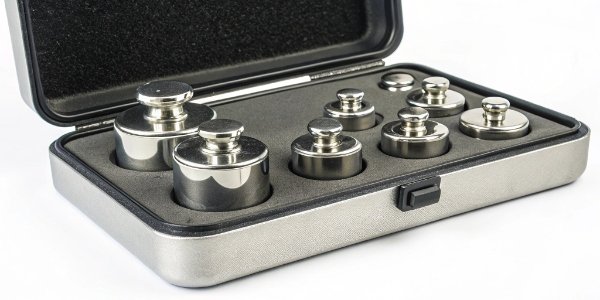
I often explain to clients that there is a huge difference between testing your scale and truly calibrating it. A certified calibration weight is a known standard. Its mass is traceable back to national or international standards, like those from NIST in the United States. This traceability is your guarantee of accuracy. For industrial use, we recommend using a weight that is between 50% and 80% of your scale's maximum capacity for the most effective calibration. Anything less than a certified weight introduces variables that make true calibration impossible. For a software provider, this is critical. Your system depends on precise input. If the weight data is flawed from the start, the output will be flawed, no matter how good your software is.
Here’s a simple breakdown:
| Method | Purpose | Reliability for Business |
|---|---|---|
| Certified Weights | Calibration & Verification | High - The only way to guarantee accuracy. |
| Household Items | Quick Spot-Check | Low - Unreliable for any business decision. |
What is the step-by-step process for putting a digital scale into calibration mode?
Confused by your scale's user manual? Unsure which buttons to press to start calibration? I understand. Entering the wrong mode can cause more problems than it solves and wastes valuable time.
While it varies by model, the general process is to turn the scale on and wait for it to stabilize at zero. Then, press and hold a specific button (often "CAL," "MODE," or "FUN") to enter the calibration menu. The display will then prompt you to place a specific weight.

While you should always treat your scale's manual as the final authority, most professional scales follow a similar logic. We design them at Weigherps to be as straightforward as possible. Here is a general guide you can follow.
Pre-Calibration Checks
First, make sure the scale is on a solid, level surface with no vibrations or airflow. Turn it on and let it warm up for a few minutes. Make sure the weighing pan is empty and clean. Once the display is stable, press the "ZERO" or "TARE" button. This ensures your starting point is a true zero.
Entering the Calibration Menu
This is the part that varies the most. You will typically need to press and hold a button for a few seconds. Look for buttons labeled "CAL," "CAL/MODE," or "FUNC." The display should change to show "CAL" or ask for a password.
Completing the Calibration
Once in the menu, the display will flash a specific weight value, for example, "50.00 kg." This is the weight it requires for calibration. Gently place that exact certified weight in the center of the pan. Wait for the display to stabilize. The scale will automatically lock in the value and typically display "PASS" or END before returning to normal weighing mode. Remove the weight, and you're done.
Can I use common household items, like coins or water, to test my scale's accuracy?
You don't have certified weights on hand. You're thinking a coin or a bottle of water can do the job for a quick check. This is a common shortcut that can give a false sense of security.
You can use common items to test for major errors, but never to calibrate. A U.S. nickel weighs 5 grams, for example. If your scale reads 10 grams, you know there's a problem. But this method is not accurate enough for a true calibration, which demands precision and traceability.

Using an everyday object for a quick check is fine for a home kitchen scale, but it's a risky practice in a professional environment. The entire purpose of calibration is to adjust your scale to a known, reliable standard. Household items are not reliable standards. Their weights vary too much. As I mentioned before, this is the difference between a quick test and a real calibration. A test tells you if something is grossly wrong. A calibration proves something is precisely right. For businesses that depend on accurate measurements for production, billing, or data collection, "close enough" is never good enough.
Let’s look at why these items are not suitable for calibration:
| Item | Assumed Weight | Potential Issues Affecting Weight |
|---|---|---|
| U.S. Nickel | 5.000 g | Dirt, oils, and circulation wear change the mass. |
| 1 Liter of Water | 1000 g | Requires pure water at a specific temperature (4°C). |
| New Can of Soda | Varies | The printed weight is the net weight of the liquid, not the gross weight. |
What should I do if my scale displays an error message after a calibration attempt?
Did your scale just show an "ERR" message after you tried to calibrate it? Are you frustrated that the process failed? Ignoring these codes or just repeating the steps rarely fixes the underlying issue and costs you downtime.
First, don't panic. An error message usually indicates a specific problem. Turn the scale off and on again. Check if you used the correct calibration weight and that the environment is stable. If the error persists, consult your manual or contact our technical support for help diagnosing it.

At Weigherps, we believe our job isn't finished when the product ships. We are here to support you. An error message1 is your scale talking to you, and understanding its language is key.
Common Error Codes and Quick Fixes
Before calling for service, run through this simple checklist. It solves the problem nine times out of ten.
- Check the environment. Is there a draft from a fan or an open door? Is the table wobbling? An unstable reading2 will cause the calibration to fail.
- Check the weight value. Are you using the exact weight the scale is asking for? Using a 10kg weight when the scale asks for 20kg will trigger an error.
- Check the load cell3. Make sure there is no debris under the weighing pan that could be obstructing its movement.
- Power Cycle. Turn the scale off, wait 30 seconds, and turn it back on. This can clear temporary electronic glitches.
If these simple steps don't work, it's time to look at the specific error code.
| Error Code | Common Meaning | What to Do |
|---|---|---|
| "ERR" / "FAIL" | General Calibration Failure | The weight was unstable or incorrect. Redo the steps. |
| "OL" / "EEEE" | Overload | You used a weight that is too heavy. Use the correct weight. |
| "UNST" | Unstable Reading | Find and eliminate the source of vibration or air currents. |
If you've tried everything and the error persists, it may signal a deeper hardware issue, like an aging sensor or a damaged load cell. In that case, it is best to contact a professional.
Conclusion
Correctly calibrating your scale ensures accuracy and builds a foundation of trust for your business data. Following these steps and using the right tools protects your operation and your profits.


[…] Most digital scales have a calibration3 mode. You might need to press a button on the back or bottom, or hold a button down. Your user […]
[…] an industrial scale manufacturer, troubleshooting9 is a huge part of our after-sales service. I’ve learned that 90% of accuracy problems are not […]
[…] and foremost, the core of calibration8 remains the same. To confirm a scale is accurate, you must test it against a known, certified […]