

Your operations depend on precision, but your scale is giving inconsistent readings. This erodes trust and can lead to costly errors. You need a reliable fix, and you need it now.
To fix an inaccurate scale, start with basic checks. Ensure it's on a level surface, away from electronic interference, and then reset it. If it’s still wrong, perform a recalibration using a known standard weight. Persistent issues may indicate a hardware fault requiring deeper inspection.

An inaccurate reading can bring your entire workflow to a halt. As a manufacturer with nearly two decades of experience, I've helped countless clients troubleshoot these exact problems. Before you consider a costly replacement or a service call, there are several steps you can take yourself. Let's walk through the process from the simplest checks to more advanced solutions, so you can get your equipment back to providing the accuracy your business demands.
What do I do if my scale is inaccurate?
Your scale is suddenly unreliable, causing delays and uncertainty. Are you worried about a complex, hidden issue? Often, the solution is surprisingly simple and right in front of you.
First, check the scale’s environment. It must be on a solid, level surface away from vibrations and drafts. Then, perform a simple reset by turning it off and on, or by pressing the 'TARE' or 'ZERO' button to clear any temporary data glitches.

In my experience, over half of all accuracy issues stem from the immediate environment or a simple system error. Before you even think about calibration or hardware, you must rule out these basic factors. An unstable foundation is the most common culprit. A scale placed on a soft carpet or a wobbly desk will never give a consistent reading because its sensors1 can't get a stable force reading. We always advise our clients to start with a quick audit of the setup. These simple checks cost nothing and can often resolve the problem in minutes, getting you back to work without any downtime.
Basic Troubleshooting Checklist
| Check Area | Action to Take | Why It Works |
|---|---|---|
| Placement | Move the scale to a hard, level floor. Avoid carpets, slopes, or unstable tables. | Sensors require a perfectly flat and stable surface to measure weight accurately. |
| Interference | Keep the scale away from devices like routers, mobile phones, and air vents. | Electromagnetic fields and temperature fluctuations can interfere with sensitive electronic components. |
| System Reset | Press the 'TARE' key to zero the scale. If that fails, turn it off, wait 10 seconds, and turn it back on. | This clears any temporary software errors or residual data that might be causing a false reading. |
| Battery Reset | For battery-powered models, remove the batteries for 10 seconds before reinserting them. | This performs a hard reset of the internal system, which can resolve deeper data conflicts. |
How to fix a scale showing the wrong weight?
Your scale consistently shows the wrong weight, even after basic checks. This makes you question every measurement. Is your expensive equipment permanently broken? Don't worry, it likely just needs to be recalibrated.
To fix a scale showing the wrong weight, you must perform a calibration. Use a standard weight of a known value. Follow your scale's manual to enter calibration mode, place the weight on the platform when prompted, and let the scale adjust itself accordingly.
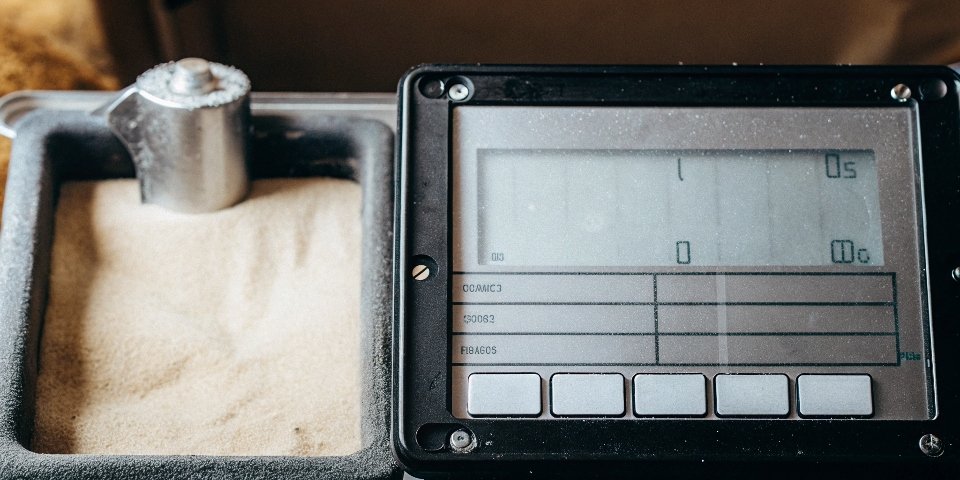
Calibration is the process of reteaching your scale what a specific weight actually feels like. Think of it as tuning an instrument. Over time, factors like temperature changes and regular use can cause a slight drift in the scale’s accuracy. At Weigherps, we build our scales with easy calibration in mind because we know it is a critical maintenance task. For most modern digital scales, this is a straightforward process. If you don't have a certified standard weight2, you can use an item with a precisely known weight, like an unopened 500g package of food or a 500mL bottle of water (which weighs 500g, minus the container).
Step-by-Step Calibration Guide
- Enter Calibration Mode: Start by turning the scale on. Then, press and hold the 'CAL' button (some models may require a key combination like 'Mode' + 'Unit'). The display should change to show 'CAL' or a flashing number, which is the required calibration weight3.
- Use a Standard Weight: The display will indicate a specific weight needed, for example, '500.0g'. Carefully place a 500g standard weight in the center of the scale's platform.
- Confirm the Calibration: The scale will measure the weight and adjust its internal settings. Once complete, the display will typically show 'PASS' or return to the normal weighing mode.
- Verify Accuracy: Remove the calibration weight and test the scale with a few different items of known weight to confirm the calibration was successful.
Note: Some scales may have an internal potentiometer for manual adjustment, but we strongly advise against this unless you are a trained technician, as it can easily damage the load cell.
What should you do if a scale is not calibrated correctly?
You tried calibrating, but the scale is still inaccurate, or the process failed. This is frustrating and points to a deeper problem. Does this mean it's time for a replacement? Not necessarily.
If calibration fails, the issue is likely with the hardware. Check the power source by replacing batteries or testing the adapter. Then, inspect the load sensor for damage or loose connections. Clean any debris from under the weighing platform that may be causing obstruction.

When a scale resists calibration, it's telling you something is physically wrong. As a manufacturer, our quality control process is designed to catch these issues, but wear and tear or accidents can happen. A fluctuating power supply4 is a common culprit; low batteries can't provide the stable voltage required for precise measurements. Similarly, a damaged or obstructed load sensor5—the heart of the scale—cannot correctly translate force into a digital reading. A visual inspection can often reveal the source of the problem. If you look underneath the scale, you might find debris blocking the mechanism or a disconnected wire that can be easily plugged back in.
Hardware Fault Diagnosis
| Problem Area | Common Symptoms | How to Fix |
|---|---|---|
| Power Supply | Readings drift, display flickers, or the scale won't turn on. | Replace batteries with a fresh, high-quality set. For plug-in models, check the adapter and cable for damage. |
| Load Sensor | The reading jumps erratically, shows an error code, or doesn't return to zero. | Turn the scale over and check that the sensor's connecting plug is secure. If the sensor is bent or corroded, it needs to be replaced. |
| Mechanical Parts | The scale wobbles, or readings change when you press on different parts of the platform. | Check the adjustable feet and ensure all are level. On older mechanical scales, aging springs or levers may need lubrication or replacement. |
How to fix weighing scale error?
You are seeing a specific error code on the display, or the scale is completely unresponsive. This feels like a critical failure. What do these errors mean, and are they fixable?
To fix a weighing scale error, first identify the code by consulting the user manual. Many errors relate to overload ('EEEE') or unstable surfaces ('UNST'). Resolve these by removing excess weight or moving the scale. For persistent errors or hardware failure, professional repair is required.

Error codes are your scale's way of communicating a specific problem. They aren't a sign of total failure; they are a diagnostic tool. One of the most common errors I see is from overloading. Placing an item that exceeds the scale's maximum capacity can trigger a protective shutdown to prevent damage to the sensor. Simply removing the weight and restarting the scale often resolves this. Regular maintenance is also key to preventing errors. Dust, dirt, or liquid spilled on the scale can seep inside and corrode sensitive components or cause short circuits. A simple routine of wiping down the scale can prevent many future headaches and extend its life significantly.
When to Call for Professional Service
While many issues are fixable, certain symptoms indicate a problem that requires expert attention. We've built our business on providing reliable after-sales support because we know when a professional touch is needed. Contact a service technician if you notice the following:
- The reading is stuck at '0' or another fixed number, no matter what you place on it.
- The load sensor or platform is physically damaged, cracked, or bent.
- After multiple successful calibrations, the error is still greater than 1% (e.g., a 1000g weight reads 989g or less).
- The scale fails to complete the calibration process repeatedly, suggesting a mainboard or firmware issue.
Conclusion
Fixing an inaccurate scale usually starts with simple environment checks and routine calibration. For persistent errors, hardware inspection is necessary, but know when to call for professional, reliable service.
-
Understanding how sensors function can help you troubleshoot and maintain your scale effectively. ↩
-
Knowing what standard weights to use can enhance your calibration process and improve accuracy. ↩
-
Learning about calibration weights is key to accurate measurements; find out how to use them effectively. ↩
-
Understanding the power supply's impact can help you maintain consistent scale performance. ↩
-
Understanding the load sensor's role can help you diagnose issues and maintain your scale effectively. ↩


Comments (0)