
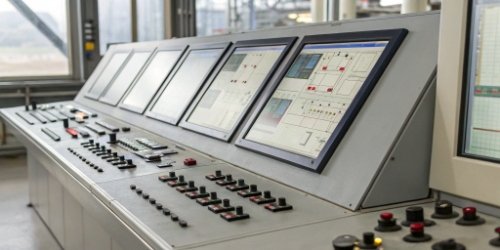
Managing different label templates across many scales causes chaos and errors. It wastes time and weakens your brand. Centralized management is the smart solution you've been looking for.
Yes, it is absolutely possible. Modern PC-based printing scales connected to a network allow you to design, update, and deploy label templates to all your scales from a single computer. This streamlines operations and ensures total consistency across your entire facility.

This capability changes everything for businesses running multiple production lines1 or packaging stations. Instead of walking to each scale with a USB drive or manually programming each one, you can make a change once and have it instantly applied everywhere. But what are the real, tangible benefits, and how do you get started? It's simpler than you might think. Let's dive deeper into how this technology works and how you can implement it.
How Can Centralized Management of Label Templates Benefit Multiple Scales?
Are you tired of the time and money wasted updating each scale individually? A simple logo change becomes a huge project, risking mistakes with every manual update.
Centralized management brings three huge benefits: it boosts efficiency, guarantees consistency, and reduces costly errors. You save valuable labor by updating all scales at once, maintain a professional brand image, and eliminate mistakes caused by manual data entry or outdated templates.
As a manufacturer with 19 years of experience, we've seen clients transform their operations with this approach. Before, a simple price update could take a manager half a day, moving from scale to scale. After implementing a central system, that same update takes less than five minutes. The benefits ripple through the entire workflow, making your entire process more robust and reliable. Let's look at the specific advantages.
Boosting Operational Efficiency
Think about the time saved. Instead of one technician spending hours updating ten scales, one person can push an update to one hundred scales in minutes. This frees up your team to focus on production and quality control, not tedious administrative tasks.
Ensuring Total Accuracy
Manual updates are a major source of error. A wrong digit in a barcode or an outdated ingredient list can lead to rejected shipments or compliance fines. Central control eliminates this risk by using a single, approved master template for every scale.
Maintaining Brand Integrity
Your label is a key part of your brand. Inconsistent logos, fonts, or layouts look unprofessional. Central management ensures every label that leaves your facility is perfectly uniform, strengthening your brand credibility with every product.
| Feature | Traditional Method (One by One) | Centralized Management |
|---|---|---|
| Update Time | High (Hours) | Low (Minutes) |
| Error Risk | High | Very Low |
| Consistency | Low | High |
| Labor Cost | High | Low |
What Systems Allow for Designing Label Templates Across Various Scales?
You know you need a better system, but what does it actually look like? Choosing the wrong hardware or software can leave you stuck with an inflexible and frustrating process.
The core of this capability lies in PC-based printing scales connected via a network (Ethernet or Wi-Fi). These scales run on operating systems like Windows or Linux, allowing them to use advanced software that connects to a central server or cloud platform for management.
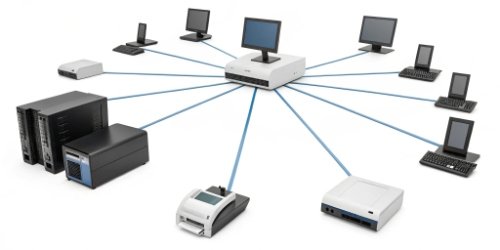
This isn't science fiction; it's technology we build into our scales every day. The key is moving away from simple, standalone scales to smarter, connected devices. A PC-based scale is essentially a computer with a weighing platform. This gives it the power to run sophisticated applications, communicate over a network, and receive instructions remotely. It’s the hardware foundation that makes centralized control possible. The software handles the design and distribution, whether online through the network or even offline with batch updates.
The Role of PC-Based Scales
Unlike basic scales, PC-based scales have a processor, memory, and an operating system. This allows them to run the label design client and communicate with a central server. They are the essential "smart" endpoint in your network.
Network Infrastructure is Key
Your scales need to be connected. A reliable Ethernet or Wi-Fi network is the backbone of a centralized system. It’s the highway that allows label templates2 and other data to travel from your central computer to every scale on the floor.
The Software Hub
This is the command center. It's a software application installed on a central PC or server. Here, you design your label templates using a drag-and-drop interface, link them to specific products (PLUs), and deploy them to individual scales or groups of scales with a single click.
| Component | Function | Weigherps Solution |
|---|---|---|
| Hardware | Smart, network-ready weighing and printing | Our custom PC-Based printing scales |
| Software | Design, manage, and deploy templates | Customized software solutions tailored to your needs |
| Network | Connects scales to the central hub | Compatible with standard Ethernet/Wi-Fi |
How Does Centralized Control of Label Templates Improve Consistency?
Do your labels sometimes look different depending on which machine printed them? This inconsistency can confuse customers, create problems for your scanners, and ultimately hurt your professional image.
Centralized control forces every scale to use the exact same master template. When you push an update from the central system, it overwrites any local versions, guaranteeing that all labels have the identical layout, fonts, logos, and data fields. It eliminates variation completely.

I remember a client in the food processing industry who was having major issues. Their scales in the meat department printed barcodes that were slightly different from the ones in the produce department. This small variation caused chaos for their inventory management system. By implementing a centralized label management system with our scales, they created one master barcode template for all products. The problem was solved in a single afternoon. That’s the power of absolute consistency.
Unifying Your Brand Image
Every label becomes a perfect representative of your brand. No more stretched logos or mismatched fonts. This consistency builds trust and makes your products look more professional on the shelf.
Meeting Regulatory Standards
For many industries, label content is strictly regulated. Information like nutritional facts, allergen warnings, or country of origin must be precise. A central system ensures every label is 100% compliant, as you only need to update one master template to meet new regulations.
Simplifying Operator Training
When every scale works with the same set of templates, training becomes much easier. Operators don't need to learn the quirks of different machines. They can move between stations seamlessly, which increases flexibility and reduces the chance of human error.
What Are the Steps to Implement Centralized Label Template Management?
You understand the benefits and are ready to make a change. But where do you start? The thought of implementing a new system can seem overwhelming and complex.
The process is straightforward. First, evaluate your current equipment and network. Then, select the right PC-based scales and management software. After that, design your master templates, deploy them to your scales for testing, and finally, train your team on the new workflow.
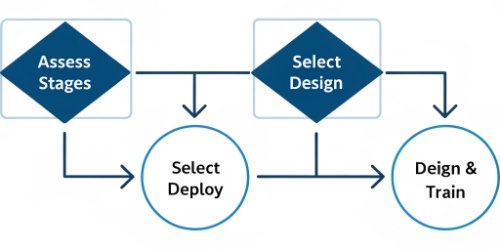
We guide our clients through this process all the time. It’s a journey from a chaotic, manual system to a streamlined, automated one. The key is to take it one step at a time. Breaking it down into these manageable phases makes the transition smooth and ensures you get the maximum benefit from your investment. A good partner will work with you at each stage to ensure the system is tailored to your specific needs.
1. Evaluate Your Current Setup
Take stock of your existing scales. Are they network-capable? What are your network's capabilities? Understanding your starting point is crucial for planning the next steps. This audit helps identify which hardware needs to be upgraded.
2. Select the Right Hardware and Software
Choose PC-based scales that fit your environment and a software solution that is powerful yet easy to use. As an OEM/ODM provider, we help clients get the exact solution they need, without paying for features they won't use. Look for a system that is flexible and scalable.
3. Design and Test Master Templates
In the software, create your ideal label templates. Include logos, dynamic fields3 for weight and price, barcodes, and any required regulatory text. Test these templates by deploying them to a single scale before rolling them out everywhere.
4. Deploy and Train
Once you are happy with the templates, push them to all your scales. The final and most important step is training your staff. Show them how the new system works and explain the benefits of the new, simplified workflow. Good training ensures a smooth adoption.
Conclusion
Centralized label management is a powerful upgrade for any business. It saves time, eliminates errors, and strengthens your brand. It turns a complex task into a simple, controlled process.



Comments (0)