

You step on your scale, hoping for a clear number, but it changes with every try. This frustration makes tracking anything feel pointless. Here’s how to fix it for good.
Your scale's inconsistency is often caused by an unstable surface, interference from drafts, low battery, or needing calibration. These factors disrupt the sensitive sensors, but simple adjustments can usually restore its accuracy.

It's a very common problem that I hear about all the time. The good news is that you don't need to be a weighing expert to solve it. In my 18 years in the industrial scale business, I've learned that most accuracy issues come down to a few simple mistakes. Understanding the root cause is the first step toward getting consistent, trustworthy measurements again. Let's walk through the most frequent culprits and how you can get your scale working perfectly.
What are the most common reasons for an inconsistent digital scale?
Seeing fluctuating numbers is confusing and makes you doubt your scale. This uncertainty defeats the purpose of weighing in the first place. Let's pinpoint the common culprits.
The most common reasons are an uneven or soft surface, environmental factors like vibrations or air currents, low batteries, and calibration errors. These issues prevent the scale's sensitive sensors from working correctly.

In my line of work at Weigherps, we build industrial scales1 that must be precise under harsh conditions. The principles are the same for your home scale, just on a smaller level. Your scale is a sensitive instrument. Its accuracy depends on a stable environment. Anything that interferes with its internal sensors, called load cells2, will cause problems. Let me break down the top offenders I see.
Environmental and Hardware Issues
The place where you use your scale is just as important as the scale itself. A wobbly floor or even a draft from an open window can throw off the reading. Likewise, the scale's own hardware needs to be in good shape. Over time, parts can wear out or get dirty. Here is a simple breakdown of what to look for.
| Problem Area | Specific Issue | How to Fix It |
|---|---|---|
| Environment | The scale is on a soft surface like a carpet. | Move the scale to a hard, flat surface like tile or hardwood. |
| Air currents from fans, AC units, or windows. | Move the scale away from any drafts. | |
| Vibrations from nearby appliances or foot traffic. | Find a quiet corner of the room away from vibrations. | |
| Hardware | Debris is stuck under or around the weighing pan. | Clean any dust, hair, or dirt from the scale's moving parts. |
| The scale's feet are not level. | Adjust the feet until the scale sits flat and doesn't wobble. | |
| Low battery power. | Replace the batteries with a fresh, high-quality set. |
These simple checks solve the vast majority of inconsistency issues. Always start with these before assuming the scale is broken.
How do you properly calibrate a digital kitchen or bathroom scale?
You worry that your scale is lying to you, but you're not sure how to fix it. An uncalibrated scale gives flawed data. Let’s make it trustworthy again.
To calibrate, first place the scale on a hard, level surface. Press the "Zero" or "Tare" button to reset it. For a full calibration, you need an object with a known weight and must follow your specific model's instruction manual.

Many people confuse "zeroing" with "calibrating." While they are related, they serve different purposes. Zeroing (or taring) simply tells the scale what "zero" is right now. Calibration teaches the scale what a specific weight (like 5 kg) actually feels like, ensuring accuracy across its entire range. At our facility, every industrial scale we ship undergoes a multi-point calibration with certified weights. You can perform a simpler version at home.
Zeroing vs. Calibrating
Think of zeroing as a quick daily check-up and calibrating as a more thorough annual physical. Both are vital for your scale's health.
| Function | What It Does | When to Do It | How to Do It |
|---|---|---|---|
| Zeroing (Tare) | Sets the current reading to zero. Perfect for ignoring the weight of a bowl. | Every time you use the scale, especially if it doesn't show "0.0" when empty. | Place the scale on a flat surface, let it stabilize, and press the "ZERO" or "TARE" button. |
| Calibration | Adjusts the scale's internal measurement to match a known standard weight. | Once or twice a year, or if you know the readings are consistently off. | You'll need a known weight. Enter the scale's calibration mode3 (check manual), place the weight on it, and confirm. |
For calibration, using a proper standard weight is best. If you don't have one, an unopened bag of sugar or a dumbbell with the weight clearly marked can work in a pinch. The key is to use an object whose weight you know for sure.
Why is it important to use a digital scale on a hard, level surface?
Do you sometimes use your scale on a rug or uneven tile? This common mistake can cause wild inaccuracies. Let’s explore why a solid foundation is non-negotiable for accuracy.
A digital scale needs a hard, level surface because its sensors require a stable base to work properly. Soft surfaces like carpet absorb force and cause the scale to tilt, leading to very inaccurate and inconsistent readings.
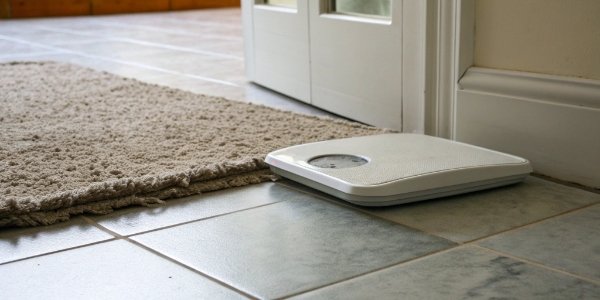
The "feet" on the bottom of your scale are more than just supports; each one contains a sensitive load cell sensor. To get an accurate reading, the total weight must be distributed perfectly evenly across all feet. When you place a scale on a soft or uneven surface, this balance is destroyed. I’ve seen this countless times. Even our heavy-duty truck scales, designed to weigh tens of thousands of pounds, need a perfectly flat concrete foundation. The physics are exactly the same for your bathroom scale.
The Impact of
Different Surfaces
Imagine trying to stand on a waterbed. Your weight would shift constantly, making it hard to get a stable footing. A scale on a carpet experiences something similar. The carpet fibers compress unevenly under each foot, which fools the sensors into giving a wrong reading.
| Surface Type | How It Affects the Scale | Result |
|---|---|---|
| Hard, Level Floor (Tile, Wood) | Weight is distributed evenly across all feet. The scale is stable. | Accurate and consistent readings. |
| Soft Surface (Carpet, Rug) | The carpet absorbs some of the force. The scale sinks and can tilt slightly. | Inaccurate and inconsistent readings, often lower than the true weight. |
| Uneven Surface (Cracked Tile) | Not all feet make firm contact. The weight is distributed incorrectly. | Wildly inconsistent readings that change every time you shift your position. |
For the best results, find a spot for your scale on a hard floor and leave it there. Moving it around can also introduce errors.
What steps can I take to reset or re-tare my digital scale for accuracy?
Does your scale show a random weight even when empty? This "ghost" reading is a common headache. Learn the simple steps to reset it for perfect accuracy from zero.
To reset your scale, first try replacing the batteries. If that fails, do a "power cycle" by taking the batteries out for 60 seconds. Always use the "Tare" or "Zero" button to ensure it starts from zero before each use.

Sometimes, a digital scale's electronics can get stuck in a weird state, much like a computer freezing. A simple reset often clears these internal glitches and restores normal function. As a manufacturer, this is the first thing our support team tells customers to try. It's easy, fast, and remarkably effective. Before you worry that your scale is permanently broken, always try a proper reset. There are a few ways to do this, ranging from a soft reset (taring) to a hard reset (power cycling).
Your Reset and Tare Checklist
Most accuracy problems that aren't related to the surface can be fixed with a reset. A low battery is the number one cause of strange behavior, so always start there. If new batteries don't work, a power cycle4 is your next best step.
| Action | What It Is | When to Use It |
|---|---|---|
| Replace Batteries | The simplest fix for a misbehaving scale. | If the display is dim, flickering, or the readings are jumping randomly. |
| Tare / Zero Button | A "soft reset" that recalibrates the zero point. | Before every use, or if the scale shows a weight when nothing is on it. |
| Power Cycle | A "hard reset" that clears the scale's internal memory. | If readings are still erratic after trying new batteries and the tare function. |
To do a power cycle, turn the scale on, then remove the batteries. Let the scale sit without power for at least one minute. This allows any residual charge in the capacitors to drain, fully resetting the electronics. Then, put the batteries back in, place the scale on a hard, flat surface, and let it turn on and self-calibrate before using it. This simple process can bring a seemingly broken scale back to life.
Conclusion
Inconsistent scale readings often come from placement, power, or calibration issues. Following these easy steps will ensure you get accurate, reliable measurements from your digital scale every time.
-
Discover the differences between industrial and home scales for better understanding. ↩
-
Gain insight into how load cells function and their role in weight measurement. ↩
-
Learn how to access calibration mode for precise adjustments to your scale. ↩
-
Learn the steps to reset your scale and resolve erratic readings. ↩



Comments (0)