

Choosing the right weighing software can feel overwhelming. A wrong decision can lead to operational headaches, costing you time and money. Understanding the differences is your first step to a solution.
Standalone weighing software is an application that runs on a separate computer or server, designed to manage data from one or many scales. Embedded scale software is firmware built directly into the scale’s hardware to control its specific, core functions without needing an external PC.
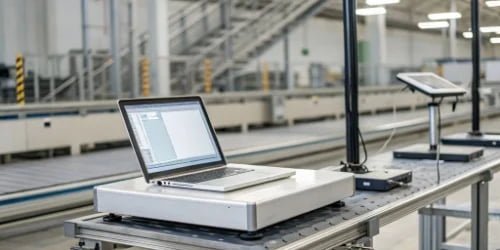
Choosing between these two options is a critical decision that will shape your entire workflow1. One offers immense flexibility and data power, while the other provides unmatched simplicity and reliability for specific tasks. It’s not about which is better, but which is the right fit for your unique operational needs. Let’s dig deeper into what sets them apart, so you can make an informed choice that helps your business grow.
How Does Standalone Weighing Software Differ from Embedded Scale Software?
You know you need a software solution, but the functional differences aren’t immediately obvious. This confusion can lead you to invest in a system that simply doesn’t fit your workflow.
Standalone software acts as a central hub for advanced data management, reporting, and integration with business systems like an ERP. In contrast, embedded software focuses only on core scale-level functions like taring, counting, or printing a simple ticket, operating independently.
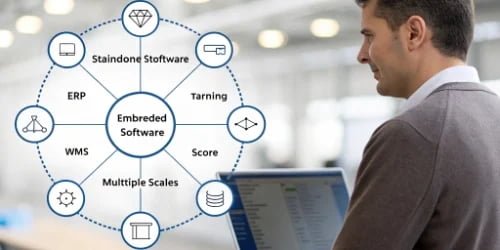
When we talk with clients, the main point of confusion is often the scope of each software type. An embedded system is like a powerful calculator—it’s fast and perfect for the specific job it’s designed for. It lives inside the scale. Standalone software is more like a complete accounting program running on your office computer—it takes data from many sources (your scales) and turns it into valuable business intelligence2. As a manufacturer, we design our hardware to communicate effectively with both. We’ve seen companies thrive when they use embedded software for quick, repetitive tasks on the production line and feed that data into a standalone system for bigger-picture analysis. This hybrid approach often delivers the best of both worlds.
| Feature | Standalone Weighing Software | Embedded Scale Software |
|---|---|---|
| Platform | Runs on a PC, server, or cloud | Runs directly on the scale’s internal hardware |
| Primary Function | Data aggregation, advanced reporting, inventory management3 | Core weighing operations (tare, zero, count, print) |
| Data Scope | Centralized database for multiple scales and business systems | Localized to a single scale, with basic data output4 |
| User Interface | Complex, graphical interface with customizable dashboards | Simple, often text-based or button-driven interface |
| Connectivity | Connects via network (Ethernet, Wi-Fi) to scales and ERPs | Connects via serial (RS-232) or basic Ethernet output |
What Are the Advantages and Disadvantages of Standalone Versus Embedded Scale Software?
Every technology choice comes with pros and cons. Picking a software type without understanding its trade-offs can lead to unexpected costs and limitations down the line. Let’s weigh them carefully.
Standalone software offers excellent flexibility and powerful features but comes with higher complexity and cost. Embedded software is simple, highly reliable, and cost-effective for its purpose but lacks scalability and advanced data management capabilities.

I remember a client in the logistics industry who initially equipped all their stations with scales running only embedded software. It was fast and simple. But, as their business grew, they had no way to track overall throughput or manage shipping data centrally. It became an operational bottleneck. We helped them connect their existing hardware to a standalone system we designed. This allowed them to keep the speed of the embedded functions at each station while gaining the central oversight they needed to scale their business. This story highlights the importance of thinking about your future needs, not just your current ones.
Standalone Software Breakdown
| Advantages | Disadvantages |
|---|---|
| Powerful & Flexible: Highly customizable. | Higher Initial Cost: Requires PC/server. |
| Centralized Data: Manage all scales from one place. | Complex to Set Up: May need IT support. |
| Advanced Integration: Connects to ERP, WMS, etc. | Point of Failure: Relies on PC and network. |
| Scalable: Easy to add more scales or features. | Requires Maintenance: Software updates needed. |
Embedded Software Breakdown
| Advantages | Disadvantages |
|---|---|
| Simple & User-Friendly: Easy for operators to learn. | Limited Functionality: Only basic weighing tasks. |
| Highly Reliable: No PC or network to fail. | Data is Siloed: Difficult to centralize. |
| Fast Operation: Dedicated hardware for one task. | Hard to Upgrade: Often requires new hardware. |
| Low Initial Cost: Included with the scale. | Limited Integration: Usually just a raw data feed. |
How Do Standalone and Embedded Weighing Systems Impact Performance and Integration?
Performance and integration can make or break your entire operation. A system that can’t keep up or doesn’t talk to your other software will only create frustration and inefficiency.
Standalone systems provide unmatched integration with business software, but their performance is tied to the host PC and network. Embedded systems offer instant, reliable performance for weighing tasks but have very limited integration options, typically a simple data port.
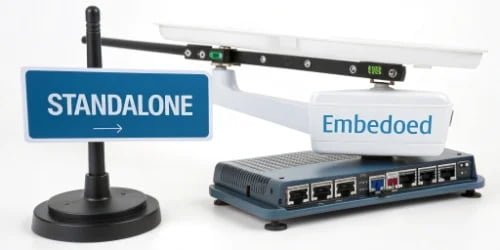
For our software vendor clients, integration is everything. They build value by making different systems work together. A standalone application is their playground—it can pull data from our scales using well-defined protocols, process it, and push it directly into a customer’s SAP or Oracle system. We design our scales with this in mind, ensuring the hardware is an open and reliable data source. Embedded software, on the other hand, is designed for a closed loop. Its performance is lightning-fast because it does one thing perfectly. Integration is possible but much more basic. It might send a weight value over an RS-232 port, which a separate program then has to catch and interpret. It creates an extra step that sophisticated standalone systems handle natively.
| Aspect | Standalone Weighing Software | Embedded Scale Software |
|---|---|---|
| Performance | Dependent on the host PC’s processing power, memory, and network stability. Can be very fast but has more potential bottlenecks. | Extremely fast and reliable for the specific weighing task. The hardware is dedicated, so there is no resource competition. |
| Integration | Excellent. Designed to integrate with other systems via APIs, direct database connections, or file sharing. Acts as a data bridge. | Limited. Typically offers a raw data stream via a serial (RS-232) or Ethernet port. Requires a "middleman" app to integrate. |
What Should You Consider When Choosing Between Standalone and Embedded Weighing Solutions?
Making the final decision can feel like a high-stakes choice. If you pick the wrong path, you risk getting locked into a system that hinders your growth instead of helping it.
Your choice depends on your operational complexity, data needs, budget, and future plans. For multi-scale operations needing central control and analytics, choose standalone. For simple, repetitive tasks on a single scale, embedded software is the efficient choice.

This is the conversation we have with our partners and clients every day. There is no single "best" answer. The right solution is the one that fits your business like a glove. We guide them through a few key questions to find that fit.
Your Operational Scale
How many scales do you need to manage? If it’s just one or two performing isolated tasks, embedded is often enough. If you have five, ten, or a hundred scales on a production floor, a standalone system is necessary to maintain sanity and control.
Your Data Management Needs
What do you need to do with the weight data? If you just need to print a label with the weight, embedded software is perfect. If you need to track inventory, generate batch reports, ensure quality control compliance, and analyze production trends5, you need the database and reporting power of a standalone system.
IT Infrastructure and Budget
Do you have the IT resources (PCs, servers, network, staff) to support a standalone system? While more powerful, it also requires more management. Embedded systems are self-contained, which simplifies things greatly. The total cost of ownership—including hardware, software licenses, and maintenance—must be factored in.
Future Growth
Where do you see your business in five years? An embedded system might solve today’s problem perfectly, but a standalone system provides the scalability6 and flexibility to grow with you.
As a solutions provider, we are positioned to help no matter which path you take. For software companies, we provide reliable, well-documented hardware that integrates seamlessly into your standalone applications. For end-users, we can offer a complete turnkey solution7, from the hardware on the floor to the custom software that runs your operation.
Conclusion
Ultimately, the right choice between standalone and embedded software depends entirely on your specific needs for data, scalability, and operational complexity. Define your goals first, then pick the tool.
-
Discover how optimizing workflows can lead to increased efficiency and productivity. ↩
-
Explore how business intelligence tools can provide insights for better decision-making. ↩
-
Explore best practices in inventory management to optimize your supply chain. ↩
-
Explore the various data outputs from weighing systems and their applications. ↩
-
Learn how to analyze production trends to make informed business decisions. ↩
-
Understand the concept of scalability and its significance in software selection. ↩
-
Discover the advantages of turnkey solutions for simplifying your operations. ↩


Comments (0)