
Frustrated by inconsistent scale readings? Your business relies on accuracy, but fluctuating numbers cause costly errors and undermine trust. It's a common problem with a simple solution.
Your scale likely gives different readings due to power issues, an unstable surface, or interference. Start by checking the battery, placing it on a hard, level floor, and moving it away from drafts or electronics. Regular calibration is also key to ensuring consistent accuracy for your operations.
I've been in the industrial scale business for 18 years, and this is one of the most common questions I get. A scale that you can't trust is worse than no scale at all. The good news is that the solution is usually straightforward. Before you assume the scale is broken and needs a costly replacement, let's walk through the same troubleshooting checklist we use with our own clients. Solving this issue might be easier than you think.
Why do my scales keep giving me different readings?
Seeing numbers jump around on your scale? This inconsistency slows down your workflow. You need reliable data for your operations, but the scale simply isn't cooperating.
Persistent inconsistencies often stem from three basic areas. Check the power supply for stability. Ensure the scale is on a solid, level surface. Also, keep the weighing area clean and free from environmental disturbances like drafts from fans or air conditioners.

When a client calls us about jumpy readings, the first thing we do is walk them through the simple stuff. These factors seem small, but they have a huge impact on modern, sensitive load cells1. We often find the problem can be fixed in minutes, right over the phone. After years of experience, we've learned to never skip the basics. Let's break down these foundational checks so you can diagnose your scale like a pro.
The Basic Checklist
| Check Area | Action to Take | Why It Matters |
|---|---|---|
| Power | Ensure batteries are fresh or the AC adapter is secure. | Low power causes electronic components to behave unpredictably, leading to unstable readings. |
| Environment | Move the scale away from vents, fans, or heavy vibrations. | Air currents or ground vibrations exert small, fluctuating forces on the scale's platform, which the sensors2 pick up as weight changes. |
| Cleanliness | Clean any debris or liquid from the scale's surface and feet. | Dirt or sticky residue can impede the free movement of the weighing mechanism, causing friction and inaccurate results. |
I once had a client whose high-precision scale was giving readings that were off by several grams. After a long call, we discovered it was placed directly under an air conditioning vent. They moved it two feet to the left, and the problem vanished. It’s almost always something simple.
Why do scales give different readings on different surfaces?
Moved your scale and now the readings are completely off? Weighing something on carpet and then on a tile floor can give you two totally different numbers, destroying your accuracy.
Scales must be on a hard, level surface to function correctly. Soft or uneven surfaces, like rugs or warped floors, absorb some of the force or distribute it improperly across the scale's sensors, leading to highly inaccurate and inconsistent readings.
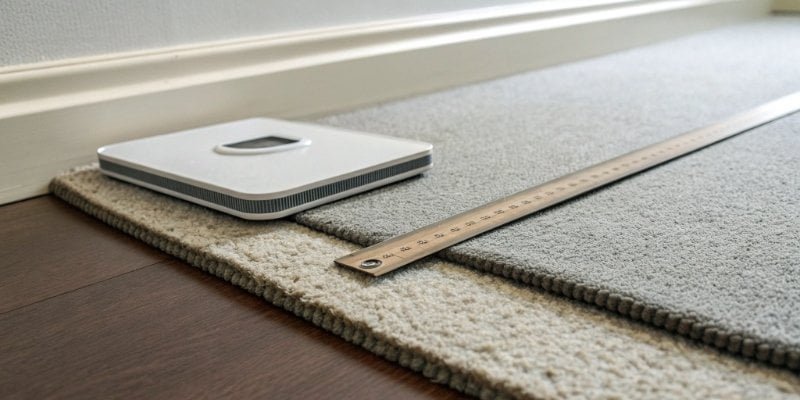
This is probably the single biggest user-related issue we see. An industrial scale is a precision instrument. Inside, it has components called load cells. These sensors are designed to measure direct, downward force. For them to work as intended, the scale must be stable and level. If the foundation is soft or uneven, the force from the object you're weighing isn't transferred correctly. The load cells get a distorted signal, and the reading on the display becomes a guess, not a measurement.
Surface Matters
As a manufacturer, we design our scales assuming they will be used on a proper foundation. Think of it like building a house; a weak foundation compromises the entire structure.
| Surface Type | Is it Good for a Scale? | Explanation |
|---|---|---|
| Concrete/Tile Floor | Excellent | Hard, level, and stable. Provides the ideal foundation for accurate measurements. |
| Thick Metal Plate | Excellent | A great option if the floor itself is uneven. It creates a stable, local "ground." |
| Carpet or Rugs | Terrible | The soft fibers compress under the scale, absorbing force and causing low, inconsistent readings. |
| Uneven Wood or Sloped Floor | Terrible | Causes weight to be distributed unevenly among the feet, overloading some sensors and underloading others. |
If your workspace has uneven floors, the simple solution is to place the scale on a thick, rigid metal or stone plate to create a reliable, level surface.
How to know if a weighing scale is faulty?
You've checked the power, cleaned the surface, and leveled the platform, but the scale is still wrong. You start to worry the hardware is broken. How can you be sure before you spend money on a new one?
A faulty scale often shows clear symptoms. If readings remain erratic after proper setup and calibration, or if the display flickers or fails to return to zero, the sensors or internal electronics may be damaged. A failure to calibrate is also a big red flag.
While most issues are environmental, hardware does eventually fail. In our quality control department, we test every single unit before it ships, but heavy use, age, or accidents can cause problems down the line. A common point of failure is the load cell itself. These sensors can be damaged by overloading (dropping a heavy weight on the scale) or by electrical surges. Another possibility is electromagnetic interference3, which can sometimes look like a hardware fault. Before concluding the scale is broken, try moving it away from large motors, microwave ovens, or two-way radios.
Diagnosing a Fault
| Symptom | Possible Cause | What to Do |
|---|---|---|
| Drifting Reading | Sensor aging or temperature fluctuation4. | Move to a temperature-stable room. If it persists, the sensor may need replacement. |
| Won't Return to Zero | Debris under the platform or a damaged load cell. | Clean thoroughly. If the problem continues, the load cell is likely damaged. |
| Fails to Calibrate | Incorrect calibration weight5 used or internal fault. | Double-check you are using the correct standard weight. If it still fails, contact a technician. |
| Totally Blank Screen | Power issue or critical internal failure. | Check power cord and outlet first. If those are fine, internal service is needed. |
If you see these signs consistently, especially a failure to calibrate correctly, it’s time to contact the manufacturer or a professional technician. Continuing to use a faulty scale can lead to significant errors in production or inventory.
Why does my scale seem wrong?
The scale gives you a stable, consistent number, but you have a strong feeling that it's incorrect. This sense of doubt can halt your entire production line. What's causing this hidden error?
If a scale provides consistent but incorrect readings, the problem is almost always calibration. The scale has lost its correct reference point. You must regularly perform a calibration with certified weights and always tare or zero the scale before each use.

This is a sneaky problem because the scale seems to be working. I've seen clients go weeks with slightly off measurements, leading to major inventory discrepancies later. A scale doesn't inherently know what a kilogram or a pound is. We teach it during calibration. Over time, due to temperature changes, electronic drift, or physical wear, this "memory" can become inaccurate. This is why regular calibration isn't just a suggestion; it's a critical maintenance task for any business that relies on weighing.
Restoring Trust in Your Scale
There are two key procedures to ensure a "right-feeling" measurement every time: zeroing and calibrating.
Zeroing (or Taring)
This should be done before every unique weighing task. It simply tells the scale to set the current reading, with an empty platform or container, as the new "zero" point. This removes any error from dust or a container's weight. It’s the simplest step to ensure accuracy.
Calibration
This is a deeper process. It adjusts the scale's internal mechanics to match a known standard.
- Enter Calibration Mode: Follow your scale's user manual to access the calibration function.
- Place Standard Weight: Use a certified calibration weight (its precision should be higher than your scale's) on the platform.
- Confirm and Save: The scale will adjust its internal settings to match the weight. Save the setting.
A word of caution: repeatedly overloading a scale, even if it doesn't break it immediately, can permanently damage the sensors and make it impossible to calibrate correctly. Always respect your scale’s maximum capacity.
Conclusion
Inconsistent scale readings are often fixable. Follow this checklist to check power, surface, and calibration first. If problems persist after these steps, it's best to contact a professional.
-
Gain insight into load cells and their role in ensuring accurate weight measurements. ↩
-
Explore the different types of sensors used in scales and their importance for accurate measurements. ↩
-
Discover how electromagnetic interference can impact scale performance and how to avoid it. ↩
-
Understanding the effects of temperature fluctuations can help you maintain scale accuracy. ↩
-
Learn how to properly use calibration weights to maintain the accuracy of your scales. ↩



[…] A scale that is slow to stabilize or shows fluctuating readings might be written off as a calibration issue3, but very often, it's just a weak battery struggling to provide consistent power to the sensitive […]